

By Minjee Yi and Shlok Patel
Introduction: Why This Matters
At Georgia Tech, a tough problem can leave you stuck at midnight with no tutor available. Many students turn to AI, but without knowing how to ask, they get quick answers with no explanation and never fully learn the material. Our GTHow guide will teach students how to write prompts based on the problem they face, such as describing where they are stuck, asking for step-by-step explanations, requesting practice problems, and having AI check their own work.
Table of Contents
Before You Start
This guide works with any AI chat tool (Claude, ChatGPT, Gemini, etc.). Gather these items first so you can follow along.
What You Need
- A problem or concept you are stuck on (Math, physics, CS, etc.)
- Your own attempt or notes, even if they are incomplete
- Your course syllabus (important to adhere to rules, more on this later)
- An AI chat tool that you feel the most comfortable with
Step by Step Guide
Follow these eight steps for a clean procedure on how to interact with AI for your problems. Ideally you should follow them in order the first time, then on subsequent uses you can skip around.
Step 1: Check Your Course’s AI Policy
Read the syllabus and ask your professor what is allowed. Doing this first lets you use AI without violating course policies or academic integrity rules. Courses usually maintain AI policies to ensure that student’s are learning the content properly and not abusing AI for quick answers. Things such as copying and pasting directly from AI are usually not allowed, and that we do not condone doing that as it does not enhance your learning experience. This guide is for learning how to use AI as a tutoring guide, but is under the assumption that AI assistance is allowed for class.
Step 2: Tell AI Who You Are and What Class You’re In
Give AI context. State your class, level, and goal. This is critical because it helps establish a baseline of where you are at and gives AI context to help support you. You can think of this step as a primer for the additional questions we will be showing you to ask your AI. This step also ensures AI doesn’t branch too far off from where your knowledge is currently at, and makes sure it gives you the correct information for your level.
Example: “I am a 2nd year student at GT in linear algebra. I want you to be a tutor who guides me through this question rather than giving me a straight answer”
Step 3: Describe Exactly Where You Are Stuck
Share the problem, what you tried, and the exact step where you got lost. In order to get the most out of AI, you need to make sure you have detailed prompts. Often times, students simply copy and paste their question into AI with no other context. You need to get specific with your problems. Instead of just copying and pasting the problem, you should type out the problem and say you got stuck at a certain step after trying a certain technique. Doing this ensures that AI is going to give you the exact response you want. You only get out of AI whatever you put into it, and don’t forget that.
Example: “I solved this integral up to this step, but I don’t understand why we use substitution here.”
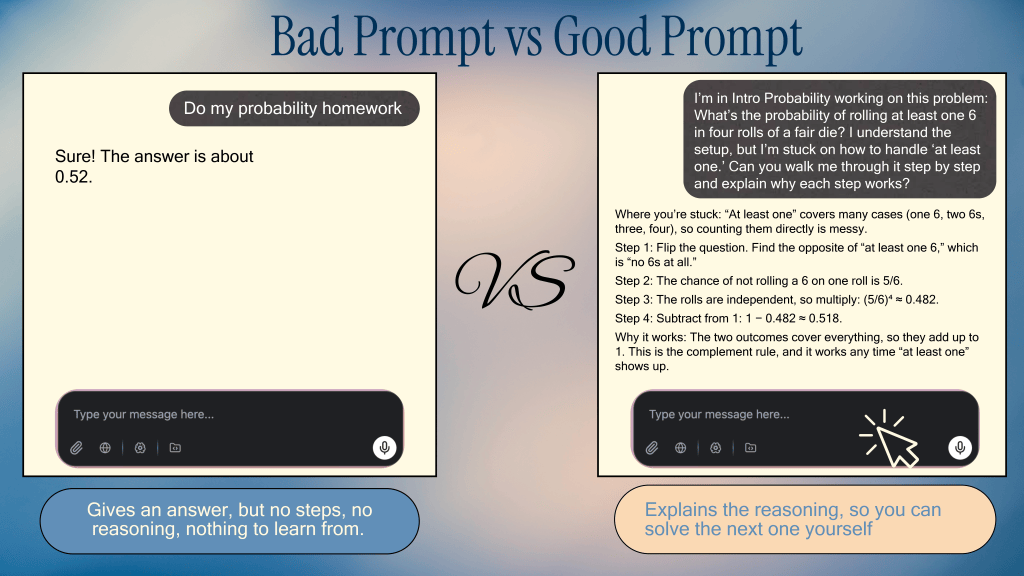
A vague prompt gets you an answer, but a detailed prompt gives you a strong explanation of the answer you can learn from.
Step 4: Ask for Step-by-Step Explanations
Ask AI to explain the reasoning behind each step. Many times students jump to the answer and just write it down with no extra thought. This is a fundamental problem with using AI as it will give you the answer first and not dive deeper. It is crucial to focus on the why of the problem and not just the basic answer. Asking for step by step explanations shows that you care about the learning process and can help you solve similar questions in the future. Remember, you are using AI as a tutoring tool, not a quick answer machine. You need to specify in your prompts that you want to know the reason behind each step for future reference.
Example: “Walk me through this one step at a time and explain why each step works. Don’t give the final answer yet.”
Step 5: Ask for Practice Problems at Your Level
Ask for similar problems at increasing difficulty. Students often forget that the benefit of using AI for work is that it can generate you the same kind of problems. Because of all the groundwork we laid back in the previous steps, your AI should be trained on what kind of problems you are doing and where you are struggling. With all this information, AI can give you plenty of practice at varying difficulties to help iron out the gaps in your knowledge. This is an important step in the workflow as it shows how you are willing to take in all the information learned from your AI tutoring session, and apply it to new problems you aren’t yet familiar with.
Example: “Give me 3 problems like this, easiest to hardest, and don’t show solutions until I try them.”
Step 6: Have AI Check Your Work
Paste in your solution and ask for feedback on your process, not just correctness. Being able to check your work with AI is a critical step, and many students already do this. What makes a difference in this case is that you have waited to work through all the steps of the back and forth conversation to have it check your problems. When you are giving AI your answers, make sure you have all your work laid out or explanations on why this answer works to further showcase your understanding of the content.
Example: “Here’s my solution. Point out any mistakes in my reasoning and explain how to fix them.”
Step 7: Follow Up When You Don’t Understand
If an explanation is confusing, ask for a simpler version, an analogy, or a different method. You shouldn’t have to conform to the way AI gives its explanations. You have free range to tell AI how you want an answer or explanation given, and you should be able to tell it exactly what you want. Including specific formats or expected response outlines is an excellent way to make the learning process easier with AI. You shouldn’t have to constantly ask AI to fix this or change that in terms of a response. Have it set up through one prompt you submit, and the AI will conform to that for the rest of the questions until you ask it to respond differently.
Example: “Explain that again using a real-world analogy.”
Step 8: Verify the Answer
Cross-check with your textbook, lecture notes, or a professor/TA, since AI can make mistakes. Ask AI to cite where a concept comes from. Many students take everything AI states as the absolute truth and choose not to question how it got to a certain point. You should always verify your answers with real sources and even your own textbooks. You can download copies of your textbook and/or notes and give it to AI to analyze. Doing this makes sure that everything it responds with is backed by reason, and you should even confirm with your teacher or TA later.
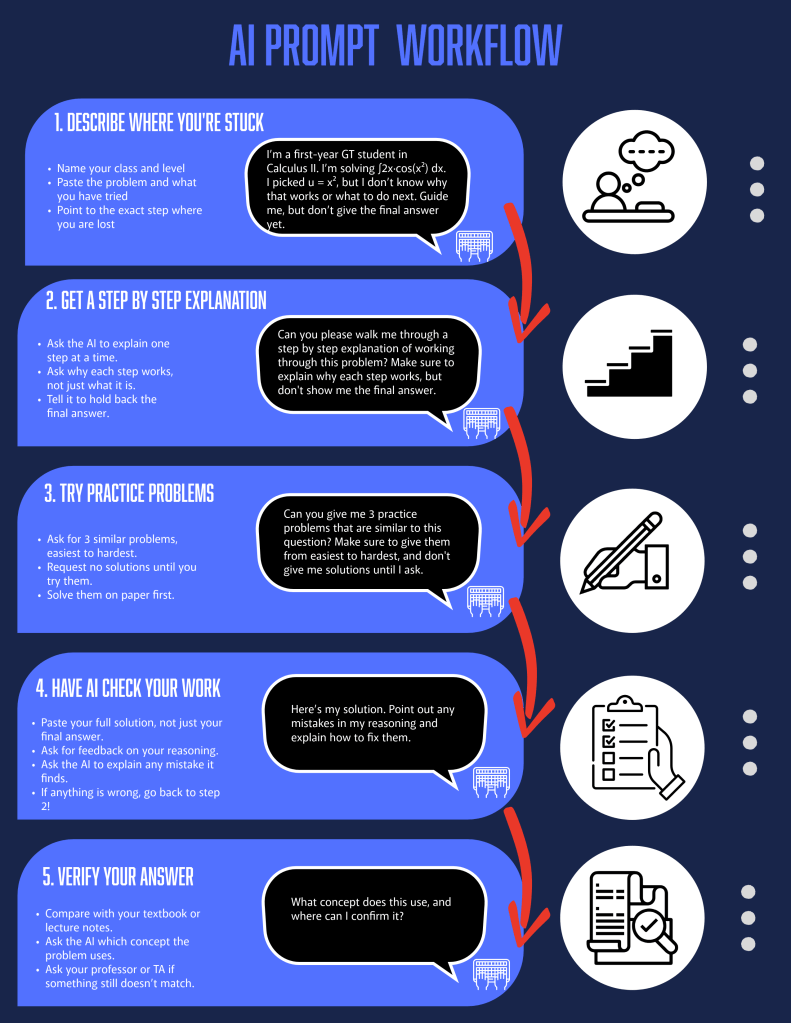
AI Prompt Workflow
Troubleshooting Weak Responses
Even good prompts sometimes miss. Use these fixes when a response isn’t helping.
Fix an Answer That is Too Short
Ask AI to explain the reasoning behind each step, or to add a worked example.
Fix an Answer That is Too Confusing
Tell AI what you already understand, then ask it to start from there.
Break Big Assignments Into Smaller Goals
Ask AI to split a large project into mini-goals so the work feels manageable.
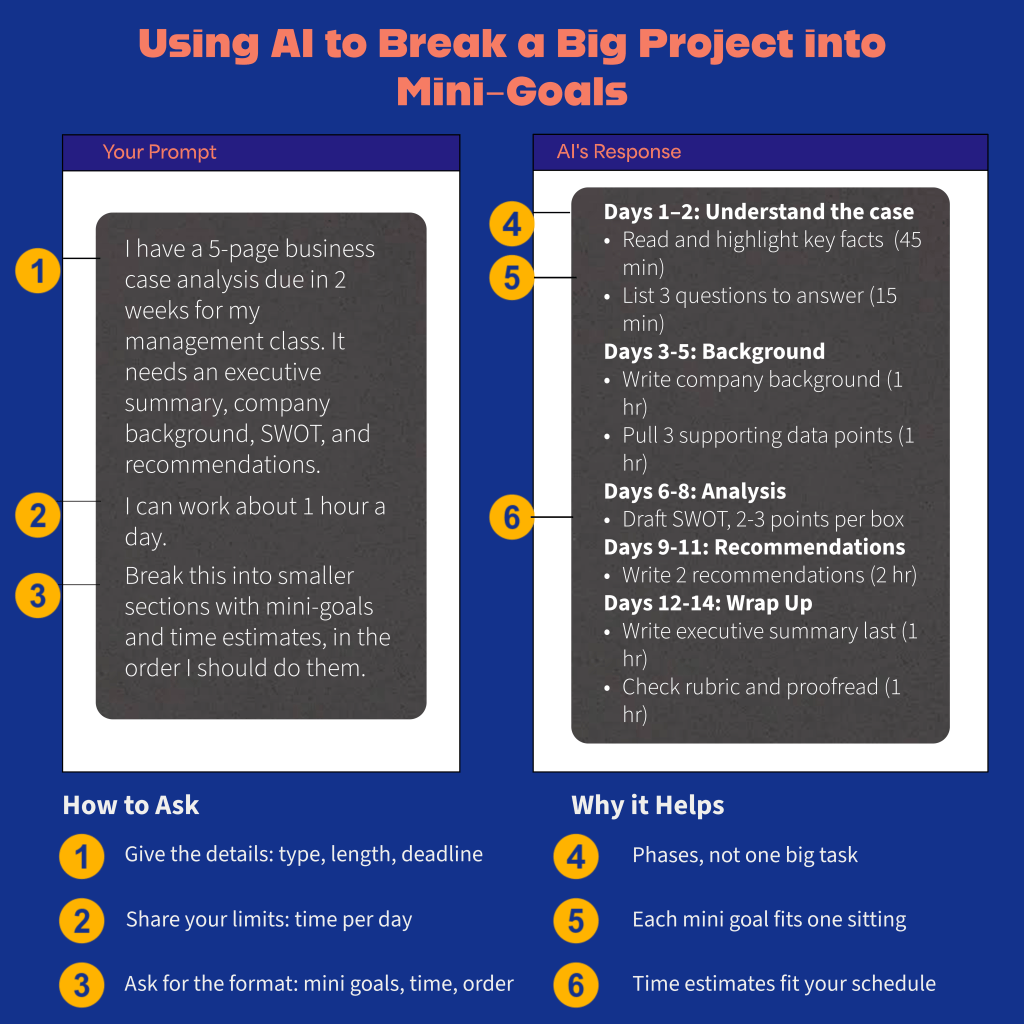
AI can break a large project into smaller sections with mini-goals, making it feel more manageable.
Conclusion
AI works best as a tutor when you tell it who you are, where you’re stuck, and what kind of help you want. Start with your course’s policy, ask for explanations before answers, practice on your own, and always verify what you learn. These habits turn a shortcut into a study tool that keeps working after the assignment is due. Don’t be afraid to tell AI exaclty what you want, make sure that every prompt you enter is detailed with everything you want in the response. This guide isn’t just for math problems, but for any kind of classwork or issue that you are facing. Try all these steps on the next problem that leaves you stuck.


Leave a Reply