

By Raya McLeroy and Tyler Lee
Introduction
Like many undergraduate students building a schedule for the first time, we felt like we lacked the knowledge and guidance into how to build an effective schedule. There were time conflicts, a lack of reputable professors, and unwanted early 8 AM classes that we had to endure during our freshman year. We decided to create a step-by-step guide that helps Georgia Tech students build an effective class schedule from start to finish. Rather than just explaining resources such as DegreeWorks or OSCAR, this guide will walk students through the entire registration process: reviewing degree requirements, planning future semesters, researching professors, creating backup schedules, and successfully registering for classes.
While Georgia Tech provides information about individual tools during orientation, many students, especially transfer students and those registering independently for the first time, struggle to connect these resources into a planning strategy. Existing guides often focus on a single platform or topic, but our post will combine multiple stages of academic planning into one comprehensive plan.
By following these steps, students can make more informed decisions about course selection, maintain a balanced workload, and better align their schedules with internships, extracurricular activities, and personal goals. This guide will help students move beyond simply registering for classes and instead develop a long-term academic plan that supports success throughout their undergraduate career. Best of luck!
Table of Contents
- Introduction
- Table of Contents
- Step 1: Check Your Degree Requirements
- Step 2: Plan Future Semesters
- Step 3: Research Courses and Professors
- Step 4: Build a Balanced Schedule
- Step 5: Prepare Backup Schedules
- Step 6: Register Through OSCAR
- Step 7: Review and Adjust Your Plan
- Conclusion
- Sources
Step 1: Check Your Degree Requirements

DegreeWorks can help you determine what classes you need to add to your schedule. The website will show you a list of every class you have taken, classes you are currently taking, and classes you need to eventually take. These incomplete requirements will also list what courses can fulfill them, further helping you decide how to fill your schedule.
Step 2: Plan Future Semesters
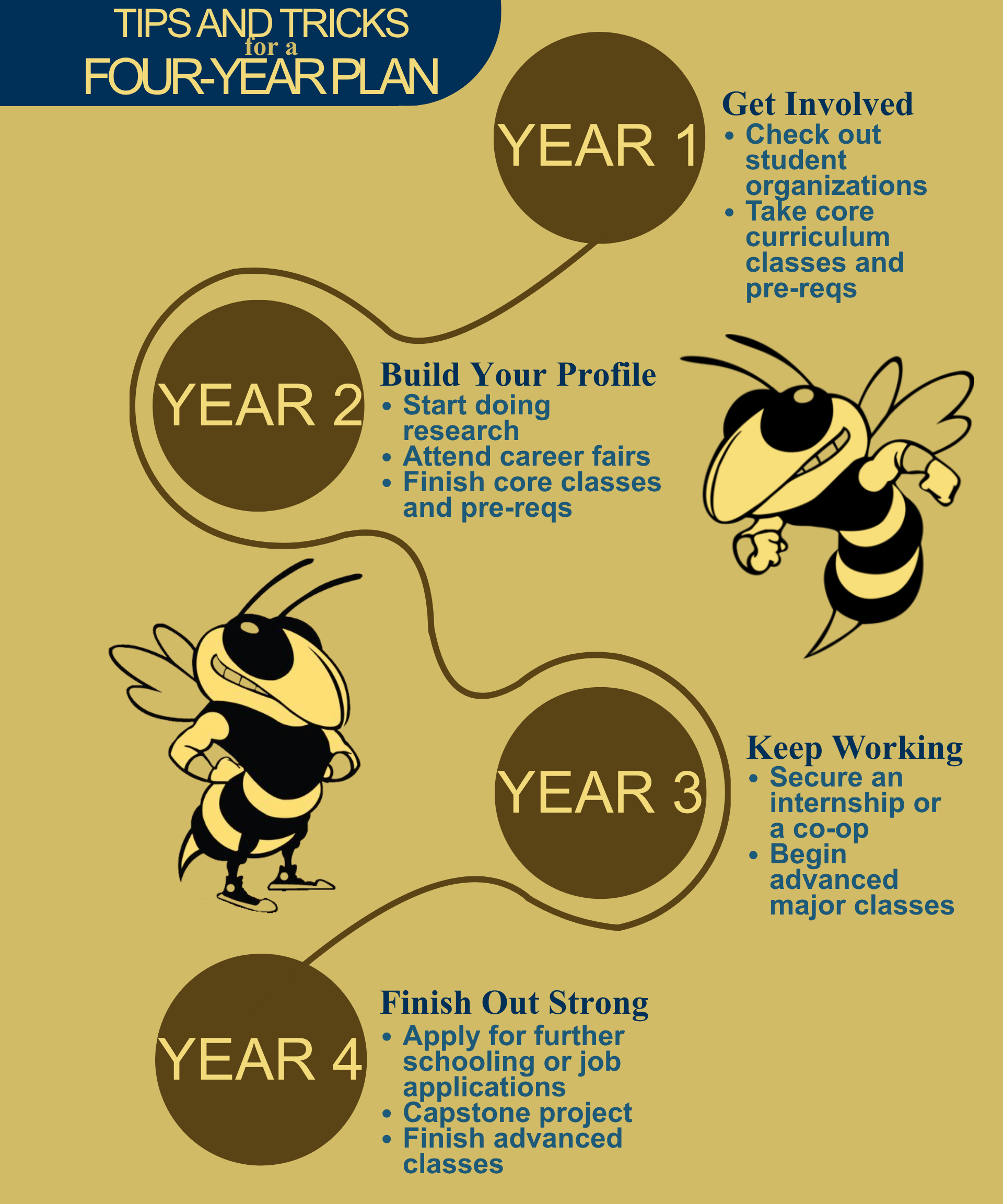
Why stop at only planning out one semester? Although you can only register for that semester, you can plan as far in advance as you would like. Knowing what comes next can keep you on track for graduation in four short years.
Creating a Four-Year Plan
If you are unsure where to start, Georgia Tech luckily provides four-year plans for a number of majors. The key to planning out the next four years of your college life is balance. Classes are not the only thing you will need to add to your schedule. Check out the infographic to the right to see how you can fit these other opportunities into your four-year plan.
Step 3: Research Courses and Professors
Before you add anything to your schedule, make sure to research your courses! When creating a schedule, you want to make sure that you don’t pack too many of these hard classes into one semester, or you might risk burnout. For example, most Tech students are told to avoid taking the “three C’s” the same semester: Calculus, Chemistry, and Computer Science. Professors also have a significant effect on the difficulty of the course.
Comparing Instructor Options
When you register for classes, there may be several sections to choose from, and each one may have a different professor. Websites such as ratemyprofessors.com provide information about those professors and what past students who have taken their classes thought of both the coursework load and difficulty.
Step 4: Build a Balanced Schedule
Taking 18 credit hours of pure STEM classes sounds like an impossible task. Furthermore, as an incoming student trying to find your footing in social circles, make your way around campus, and possibly navigate a whole new state or city, it may be even more ridiculous. Make sure to balance your schedule; don’t overwhelm yourself with too many classes your first semester, and don’t take too many STEM classes at once.
Managing Workload and Time Commitments
Setting aside time for both work and fun is important for meeting deadlines, but also for giving yourself a break. Consistency is key! If you plan out when to regularly work on your assignments ahead of time, you can spare yourself the dread of accidentally missing a deadline and give yourself more freedom.
Step 5: Prepare Backup Schedules
You may not get into all of the classes you originally planned for. Time tickets are given out based on credit hours, and typically, freshmen have the lowest credit hours and thus the latest time tickets. In order to make sure that registration goes smoothly for you, create backup schedules with courses you can take in case you don’t get everything you need.
Step 6: Register Through OSCAR
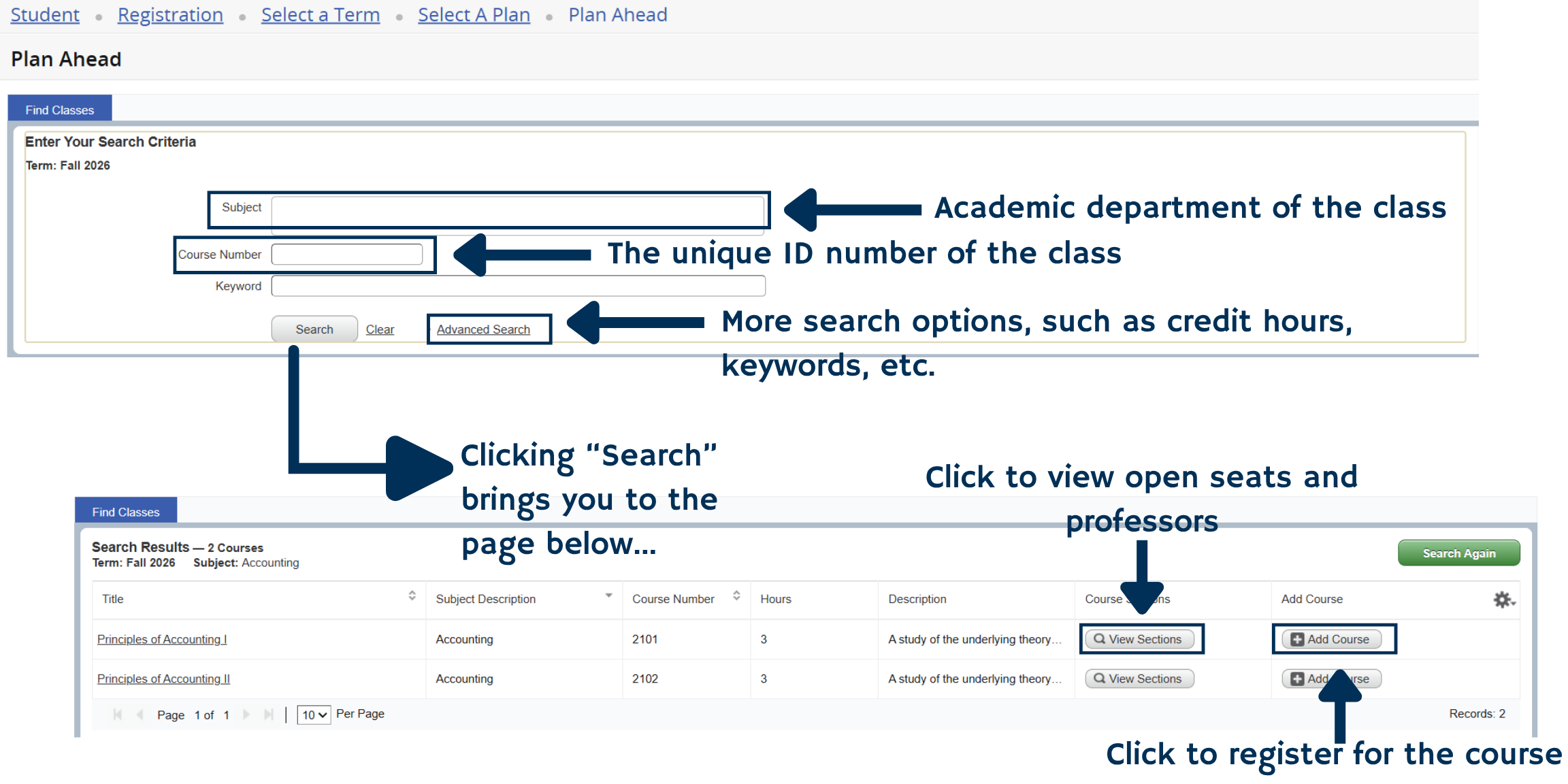
Your time ticket has opened, and you are now ready to register for your classes through the OSCAR application! Remember to refer to your four-year plan. To the right, we have provided a tutorial of the “Plan Ahead” section; it isn’t the same, but it is very similar to what registration will look like day of.
Step 7: Review and Adjust Your Plan
If you ended up having to use a backup schedule, make sure to update your four-year plan accordingly.
Conclusion
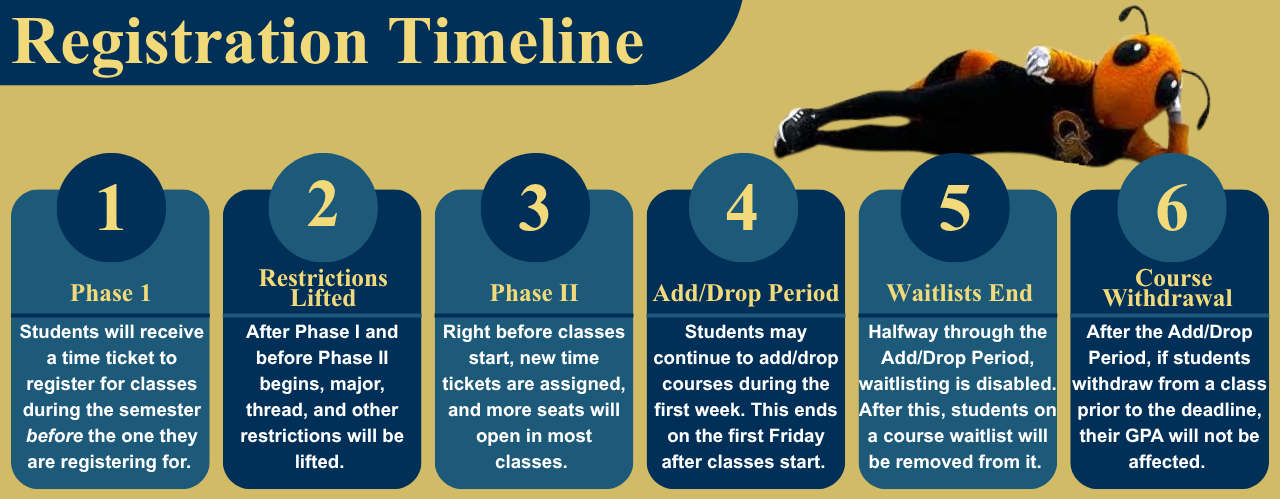
Once you have one registration under your belt, you will likely find future registration cycles much easier! Prepare for these registration cycles by familiarizing yourself with the registration timeline provided and watching out for the official course schedules each semester. Good luck and happy scheduling!


Leave a Reply