
A step-by-step guide to finding registration, financial, and housing tools through Georgia Tech’s student portal.
Table of Contents
- Table of Contents
- Getting Started with BuzzPort
- Step 1: Log in to BuzzPort
- Step 2: Understand the BuzzPort Dashboard
- Step 3: Locate Registration Tools
- Step 4: Check Academic Information
- Step 5: Access Financial Information
- Step 6: Find Housing and Campus Resources
- Step 7: Use Announcements and Quick Links
- Conclusion
Getting Started with BuzzPort
BuzzPort is Georgia Tech’s central student portal used to access essential academic and campus services. Through BuzzPort, students can register for classes, view academic records, check financial information, and access housing and campus resources. Because many of these tools are organized within different sections of the portal, new students may initially find it difficult to locate the services they need. The following steps will guide you through the key features of BuzzPort and show you how to efficiently navigate the platform.
As first-year students transition into college, everything feels new and on top of this, they need to quickly learn how to navigate essential Georgia Tech’s digital platforms to pay tuition, register for classes and manage housing. Although many students are already comfortable with technology, Georgia Tech’s student websites such as Buzzport assume insider familiarity with the institutional UI and terminology. This causes a usability gap in which incoming and new students must make important decisions with interfaces they are not familiar with.
Without clear guidance, students may struggle to locate important tools, interpret unfamiliar menu options, or complete necessary tasks efficiently. These difficulties can add unnecessary stress during an already overwhelming transition period. This GTHow tutorial aims to provide a concise and navigable guide to BuzzPort. Students will be able to find simplified run-through of key features and explanations of necessary steps and why they are integral. The combination of these structured instructions with helpful visuals and infographics aims to minimize confusion and make GT’s digital system more welcoming. This simplified onboarding process will allow students to focus on all the other new adjustments that come with moving to college
Step 1: Log in to BuzzPort
- Go to the BuzzPort login page through the Georgia Tech website.
- Enter your GeorgiaTech username and password.
- Complete Duo two-factor authentication if prompted using your phone.
Once logged in, you will be directed to the BuzzPort dashboard.
Step 2: Understand the BuzzPort Dashboard
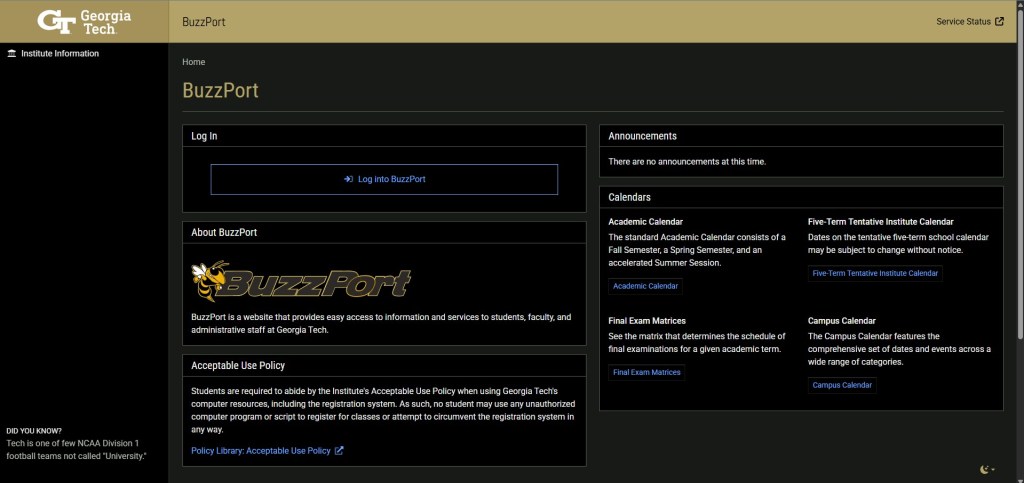
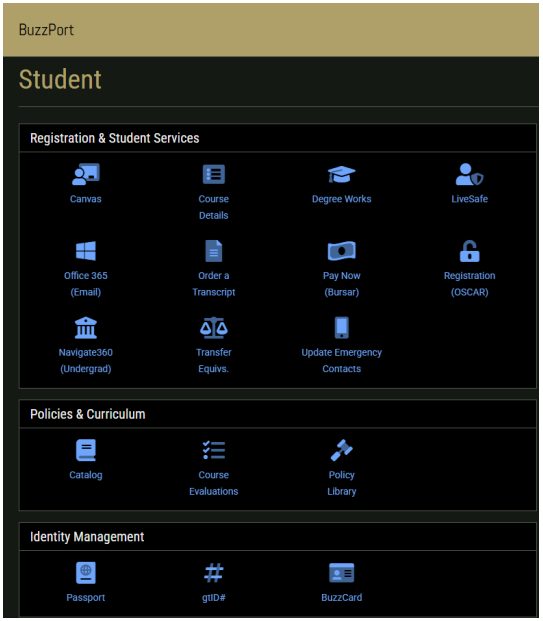
This dashboard will be your main hub for accessing student tools. It is divided into several important sections such as:
- Canvas
- Financial services
- Student records
- Campus resources
Each section contains shortcuts to useful and important tools.
Take a moment to explore and familiarize yourself with this page as understanding the layout will save time later.
Step 3: Locate Registration Tools
The process for registering for classes are as follows:
- Navigate to Registration(OSCAR)
- Open the course registration system.
- Browse classes
- Search, add or drop classes as needed
It is especially important to be familiar with this process by registration periods to ensure a smooth process.
Step 4: Check Academic Information
BuzzPort also allows students to access important academic information related to their classes and degree progress through tools like Student Records and DegreeWorks. These tools help to view schedule, check completed courses or monitor degree requirements.
Click on the appropriate link to view your current class schedule, academic history, or degree progress. For example, DegreeWorks provides a detailed breakdown of completed courses, remaining requirements, and how your current classes apply to your degree plan.
Regularly checking this information helps precent registration issues.
Step 5: Access Financial Information
To manage finances from BuzzPort:
- Go to Pay Now(Bursar).
- View tuition balances.
- Check financial aid.
- Make payments by pressing the Make Payment button.
- Fill in payment method information as needed.
Being aware of deadlines helps avoid late fees or registration holds later on.
Step 6: Find Housing and Campus Resources
BuzzPort also provides quick access to housing services and other important campus resources. From the dashboard, locate the section that links to Housing, Campus Services, or related student resources. These links connect students to tools for managing housing assignments, submitting housing requests, and accessing additional campus support services.
Click the housing or campus resources link to open the relevant portal. From there, students can view housing information, check updates related to their residence hall, and access other campus systems such as dining services or student support programs.
Knowing where these resources are located in BuzzPort can help students quickly find important information about their living arrangements and other campus services throughout the semester.
Step 7: Use Announcements and Quick Links
BuzzPort also contains an announcement section along with quick links for efficient access.
The Announcements area displays notifications from Georgia Tech about events, registration periods, or important reminders. Checking this section regularly can help students stay aware of upcoming deadlines or changes to campus services.
The Quick Links section provides direct access to frequently used systems such as registration tools, academic records, or other campus platforms.
Familiarity and regular checks with these two areas can help you stay organized and informed.
| Task | Where to Find it |
| Register for classes | Registration Tools |
| View schedule | Academic Information |
| Check Degree Progress | Academic Information |
| Pay Tuition | Financial Services |
| Check Campus Updates | Announcements |
Conclusion
BuzzPort is an essential tool for any successful student at Georgia Tech as it assists in managing academic and campus life at Georgia Tech. Although it might seem complex at first, an understanding of the dashboard and its layout makes it much easier to use.
By following these steps, you can master BuzzPort’s layout and ensure you stay on top of important tasks. With a little practice, any task becomes straightforward, which allows you to focus on coursework and maximizing your overall college experience at Georgia Tech.


Leave a comment