

By Amy Tran and Max Wang
Introduction
Joining a recreational sport is a great way for students to meet new people, get involved in the community, and stay active. However, the registration process can be intimidating and finding the right sport can be difficult. This guide teaches you how to choose the perfect intramural sport at Georgia Tech.
Currently, information about intramurals is split between the GT intramural website and IMLeagues, making it harder for students to find everything they need. Our guide will bring this information together and provide additional details to help students make decisions about and feel more comfortable with participating. It will walk students through the process of joining intramurals by explaining what sports are available, what types of teams they can join, how to find teammates, and how to sign up. By the end of this guide, you have all the information you need to successfully register as a team with your friends.
1. Choose Your Sport
Georgia Tech Campus Recreation hosts 20+ intramural sports over the year. Choosing the right sport can enhance your experience by playing to your strengths and interests.
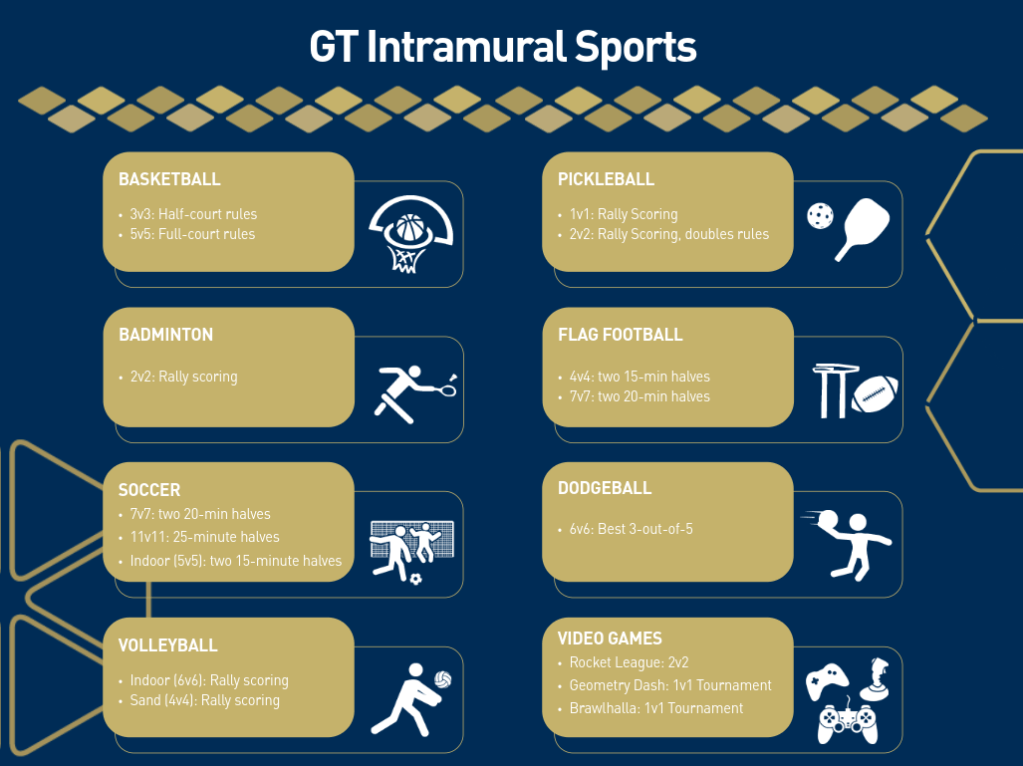
To look at the active sports being offered for the current semester, you can open the Georgia Tech Intramural Website and scroll down to the list of active sports. This will also have information about which divisions are offered, when registration opens, and the start and end dates for the season for each sport. Clicking on the name of a sport will direct you to that sport’s page on IMLeagues with a short description of the sport and where it will be hosted.
2. Find your Team
After selecting a sport, now it’s time to select members for a team. Be sure to check the team size requirements for your sport before choosing your teammates. For example, for a 6v6 indoor volleyball co-rec team, one team can only field 3 men and 3 women at a time.
You can also join sport-specific group chats to connect with other players or create your own! Keep in mind that your team’s overall skill level and experience will determine what division you qualify for and play in.
3. Select the Appropriate Division
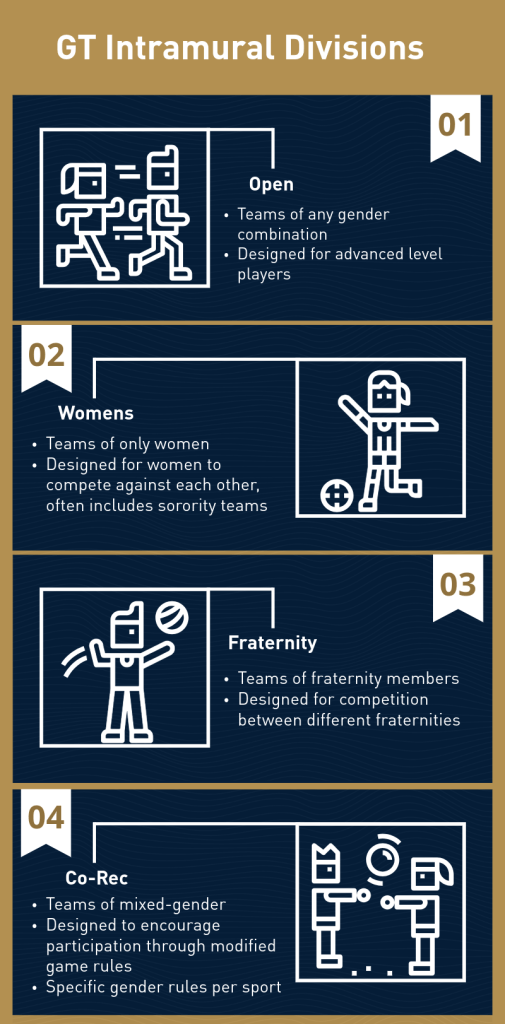
Sports can be organized into different leagues/divisions depending on the sport, which influence the composition of teams. Within each sport, only teams of the same division will compete against each other. You can view the offered divisions for each sport under the active sports list.
The four different league types are Fraternity, Open Competitive, Women’s, and Co-Rec. Each league has different team composition rules, so be sure to review the requirements and restrictions for each division before choosing one.
4. Review the League Rules
Once you have chosen a sport and division, it is important to make sure that you fully understand the policies of your chosen sport. There is an online handbook for each sport which can be found on the Rules & Policies Page of the GT IMleagues website. To access the handbook for your sport, you should locate the name of your chosen sport and click on the “Download” link to open a pdf which will contain the rules of that sport.
Handbooks contain important information for how competition is conducted including substitutions, scoring, penalities/faults, and basic game rules. Handbooks may also contain division specific rules, for example in Co-Rec indoor volleyball, it indicates that if it takes more than one touch to send a ball back over, at least one of the touches must be made by a female player.
5. Create an Account
To participate in GT Intramural Sports, you must first create an account on IM Leagues. The information in your account can help determine eligibility for joining teams such as your gender identity.
Steps to Create a GT IM Leagues Account

- First visit the GT IM Leagues Website.
- Click on the “CREATE ACCOUNT” button located in the upper right-hand corner of the page, This will direct you to use your Georgia Tech SSO to create an account.
- Click on the “Continue to Georgia Tech sign-in”. This will direct you to the Georgia Tech CRC login page.
- Click on the “GT Username” button to bring you to the Georgia Tech Login Service.
- Login using your GT username and password.
note: This may also launch the DUO 2-factor authentication process. - Follow the directions to be redirected back to the IM Leagues website to continue creating your account.

- You will be led to a page that will ask you to fill out some personal information and then finalize creating your account.
6. Pay Your Registration Dues
In order to register and get involved in GT Intramurals, all players must purchase a GTIM pass. Students are able to purchase passes for the semester for $25.
Video Guide for Purchasing a GTIM Pass:
7. Create or Join a Team
Once you have an account and have paid for a GTIM pass, you are now ready to officially join a team! You can create or join a team once registration opens for your specific sport and division. Be sure to identify when this is and to plan for which time you want to sign up for. If you have a team, communicate what you want your team name to be and who will create it, then have all your known members join.
Video Guide on How to Create a Team:
Video Guide on How to Join a Team:
Conclusion
Overall, intramural sports can be challenging to navigate, especially if you’re a new student and/or unfamiliar with the registration platform, competition formats, and division requirements. With so many sports and options, starting can feel overwhelming at first. However, once you’ve joined a team, intramural sports can be incredibly fun and rewarding. They provide a great opportunity to stay active, meet new people, and build friendships. Whether you’re playing competitively or for fun, intramurals are a great way to get involved in your college community.


Leave a Reply