
By Jason Yust & Annabelle Lee
Connecting with Mentors and Alumni Through GT Connect
During your early career, sometimes it’s not about what you know, but rather about who you know.
As an underclassman at Georgia Tech, some students may feel lost in their collegiate journey and seek mentorship from upperclassmen or alumni who have been in similar situations. Cold-contacting alumni or other mentors can feel very intimidating, especially on professional platforms such as LinkedIn. Thankfully, there are existing solutions for Georgia Tech students that can make connecting easier.
What is GT Connect
“GT Connect” is a multi-use platform that offers several services such as connecting with mentors, joining interest groups, and even a job board. Since you are required to have an active Georgia Tech email to register, students are assured that the people they are connecting with are fellow students or alumni. Using the site’s various tags and filters, students are able to search for needs that suit their situations, connecting them with the best mentor possible.
After graduation, any alumni willing to connect with students may also create an account as a mentor. Alumni from all backgrounds and career paths are welcome to share their experiences and teach the next generation. From finding mentors to hosting alumni events and interest groups, GT Connect is the best place to bridge the gap between student and alumni.
Table of Contents
Create Account
To get started, we first need to create an account.
- Sign in with GT SSO
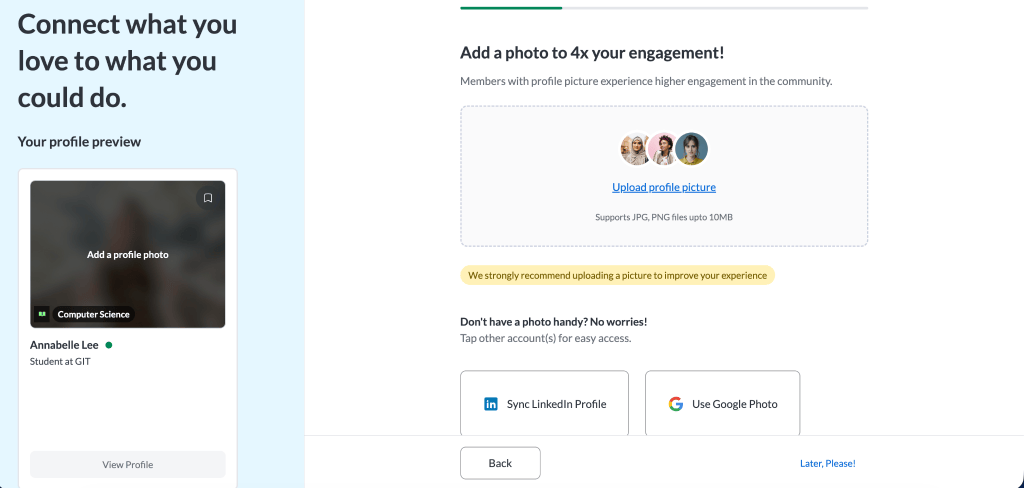
- Fill out your educational profile, add photos, and sync your profile with LinkedIn or Google
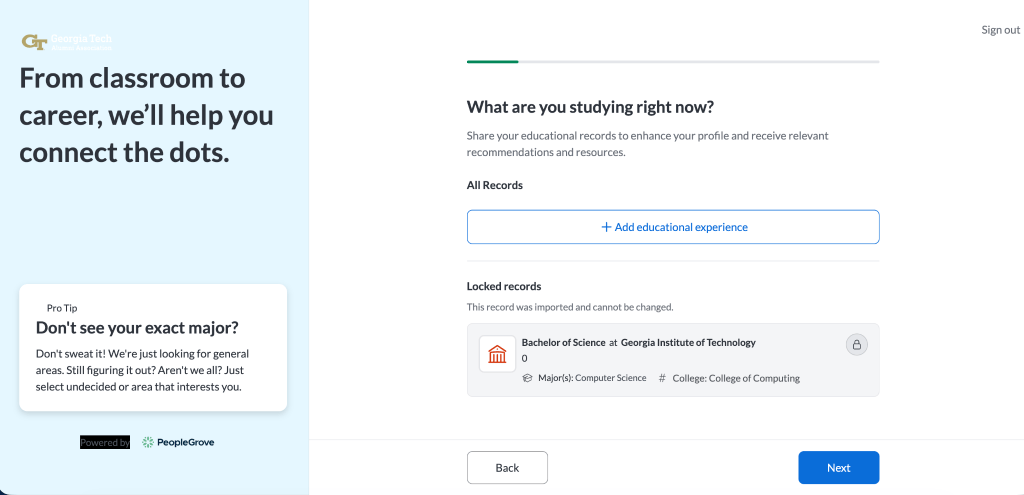
- Fill out the Matching Quiz (You can edit these later)
- I am interested in following industry
- I am interested in receiving help on the following topics…
- I am interested in the following job functions…
Optimizing your Profile
It may be beneficial to make your profile more appealing to potential connections. This can be done in several ways, including:
- Adding a descriptive summary, major, and year
- Adding a motivation for joining GT Connect
- Adding some general interests.
- Adding a personal photo
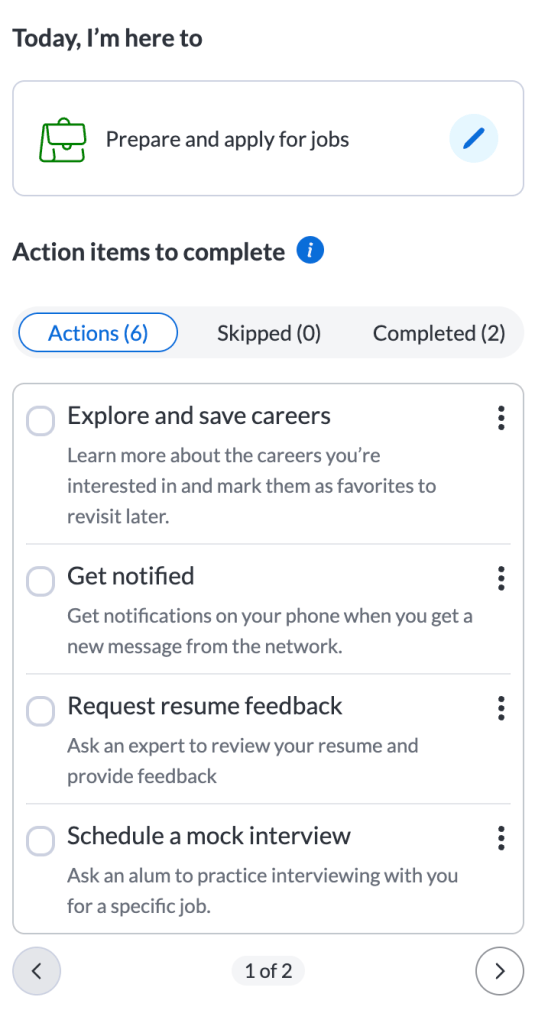
Additional actions that may be helpful are also outlined by GT Connect on the sidebar.
Reaching out to Alumni
If you missed the mentorship program deadline or have a specific question (industry, major, or career path) to a specific person, you can message alumni.
Connect with Community
- On top navigation bar, go to connect tab
- Under the Connect tab, press ‘Connect with Community’
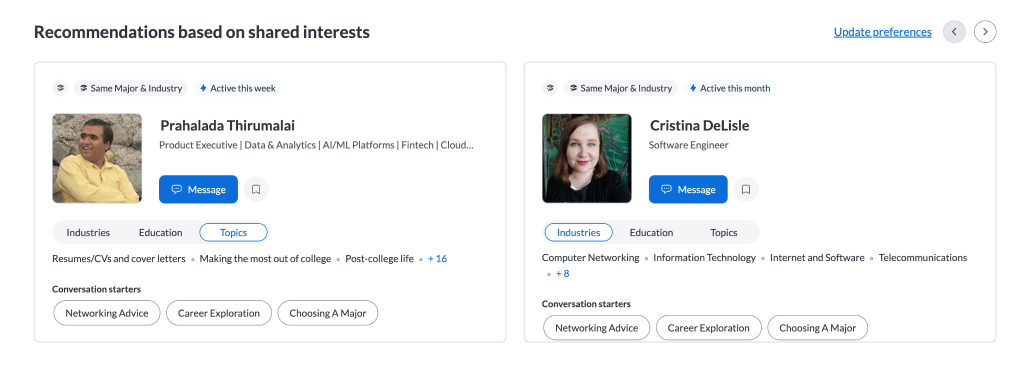
- Based on your preference, GT Connect suggests who to connect with
- Scroll through the recommended list. You can view if you have shared interest, major, and career path
- You can change your preference later
Messaging People
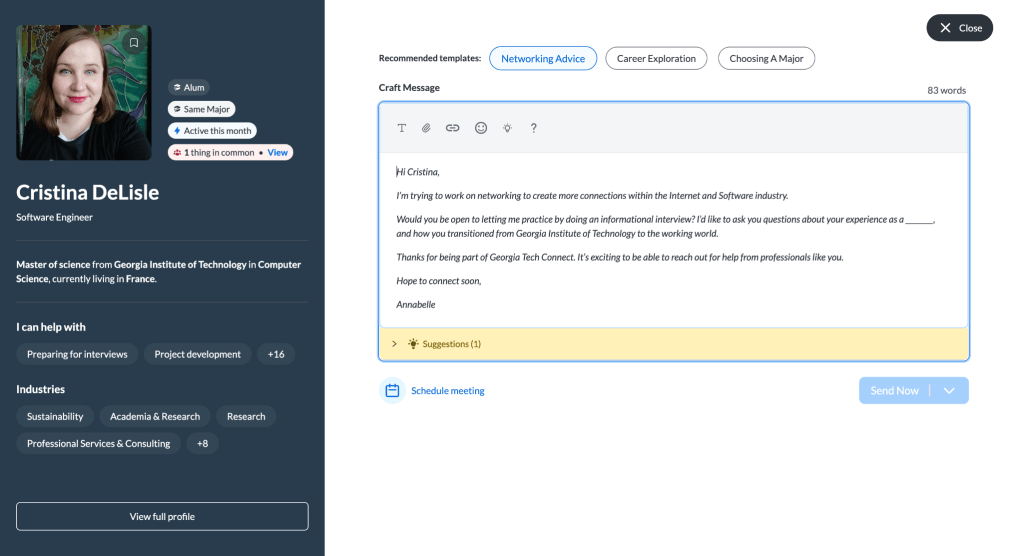
- On the profile, click on their name, then click the “Message Jane Doe” button
- GT Connect provides you with templates for your message
- Networking Advice, Career Exploration, Choosing A Major
- Personalize the template and send the message
Enroll in a Mentorship Program
Mentorship programs match you with an alumni and provide a structured student-alumni connection experience. Note that the mentorship programs have a deadline to apply.
- On top navigation bar, go to the Connect tab
- Browse the programs and look for mentorship programs that suits your demographic
- Some mentorship programs are specific to a major or a cultural group.
- Click on the program, and press Join
- Fill out the questionnaire. These questionnaires are used in the matching process, so answer them earnestly!
Career Opportunities
GT Connect provides several different resources for kick-starting your career, including prerecorded career development webinars as well as details on specific career paths.
Career Development
The Career Development page contains links to several prerecorded webinars that go over different aspects of businesses and how to run them.
- Navigate to “Career Development” under “Career” on the top navigation bar.
- Here, there are several recorded “webinars” that detail different aspects of a career path.
- “Developing an AI-First Mindset”
- “Cybersecurity – The Threat Continues and Changes”
- “Franchising 101”
Career Paths
The Career Paths page gives students overviews of different career paths, ways to begin on them, and relevant connections that are available to contact.
- Navigate to “Career Paths” under “Career” on the top navigation bar.
- If not already provided, the page will ask for at least one hobby to provide relevant recommendations.
- There are several ways to discover a career path:
- Recommendations: Based on your chosen hobbies and previous viewed paths.
- By Industry: Allows the student to select a specific industry first, then find paths related to that industry.
- Inspiration: Other miscellaneous paths that could interest the user.
- Once inside a career path, sections such as “Work Responsibilities”, “Skills you’ll need”, and “Common level of Education” allow the user to get a feel for the industry and whether they want to continue looking into it.
- If the student decides to continue researching the industry, there are links to available mentors who have worked in the field as well as some open job applications.
Other Resources
GT Connect isn’t the only way to stay connected! Georgia Tech provides several other resources that may also be helpful:
- Career Buzz: https://career.gatech.edu/careerbuzz/
- GT Engage: https://gatech.campuslabs.com/engage/


Leave a Reply