
Table of Contents
1. Introduction
Classes at Georgia Tech can move fast. Professors will cover new material every lecture, and as exams and assignments begin to pile up, you’re expected to apply those ideas, not repeat them. Most students respond to this pressure by copying lecture slides word for word; though this feels productive, it doesn’t build up the memory you need on the exam.
This guide helps you process lectures while they’re happening, instill that new information in your memory, and know exactly what to study for when the test comes. This guide walks you through how to choose a note-taking format, tools, and style, focusing on the Cornell note-taking method. Then, it delves into how to effectively apply this note-taking to your classes as well as how to study your notes. Lastly, it gives a quick overview of how these methods can be taken beyond the lecture material.
2. Getting Started
When you arrive at college, people will have a variety of ways they take notes, and in short there isn’t a correct way, just what works best for you. But you may be asking yourself, how do I know what works well for me? This section is here to help you understand that.
2.1 What to Consider
Your first major decision when coming into any semester will be deciding whether to take notes on paper or digitally. There are a few key questions to help you decide which is best for you! Ask yourself:
Will a class require you to work on labs or studio sheets?
Some STEM classes may require you to fill out long labs or worksheets. These can be easy to upload to digital formats, but may become a pain to print out before every class. Think about whether or not you want to spend your time on that!
Will having separate notebooks for each class make a heavy backpack?
Some semesters you may only take notes in one lecture, while others every class requires it! Think about whether or not you want to keep track of multiple notebooks.
Which will help me stay more organized?
One of the most important and overlooked things is making organized notes that are easy to come back to. Think about which format may help you stay more organized.
When have I taken successful notes before?
Think back to high school. Did you enjoy your note-taking experience, or did issues get in the way? A lot of those issues can be solved by tweaking the way you take notes.
| Digital | Physical | |
| Pros | 1. Searchable, so you can find a topic in seconds 2. Easy to edit, reorder, and back up 3. Slides and lab sheets can go right next to your notes 4. One device replaces a stack of notebooks | 1. Fewer distractions, since there are no notifications or tabs to wander into 2. Writing by hand pushes you to summarize instead of copying word for word 3. Easy to sketch diagrams, arrows, and equations 4. No battery to die mid-lecture |
| Cons | 1. Easy to get distracted by messages and other tabs 2. Typing makes it tempting to transcribe everything 3. Tablets and styluses can be expensive 4. Battery and Wi-Fi can become problems | 1. Heavy with multiple notebooks 2. Hard to search or reorganize later Messy handwriting and mistakes are permanent Lab sheets and slides need to be printed |
2.2 Useful Tools
Depending on which of the two is more favorable for you, there are a variety of tools that can be helpful! If you decide that physical notes are easier for you, I’d recommend purchasing a spiral-bound, college-ruled notebook, as it lies flat and lets you tear out pages for review. As for digital notes, there are a variety of services depending on whether you’re using an iPad or a computer. On a computer, programs like Google Docs and Word get the job done. But many other platforms offer more. OneNote allows for great cross-platform use, and Notion has an AI agent built in and lets you build reusable templates, like a Cornell layout you can copy for every class. Lastly, if you’re using an iPad, there are a variety of apps like GoodNotes or Notability, along with the previously mentioned OneNote.
3. Notetaking method
There are a verity of ways to take notes, in this article we will be going in-depth on the Cornell method. Though in note taking its far from a one size fits all, its important to do something that works for you. Don’t be afraid of trying a method and not liking it. These are simply frameworks you can change and edit stuff within to note take in the best way that fits you.
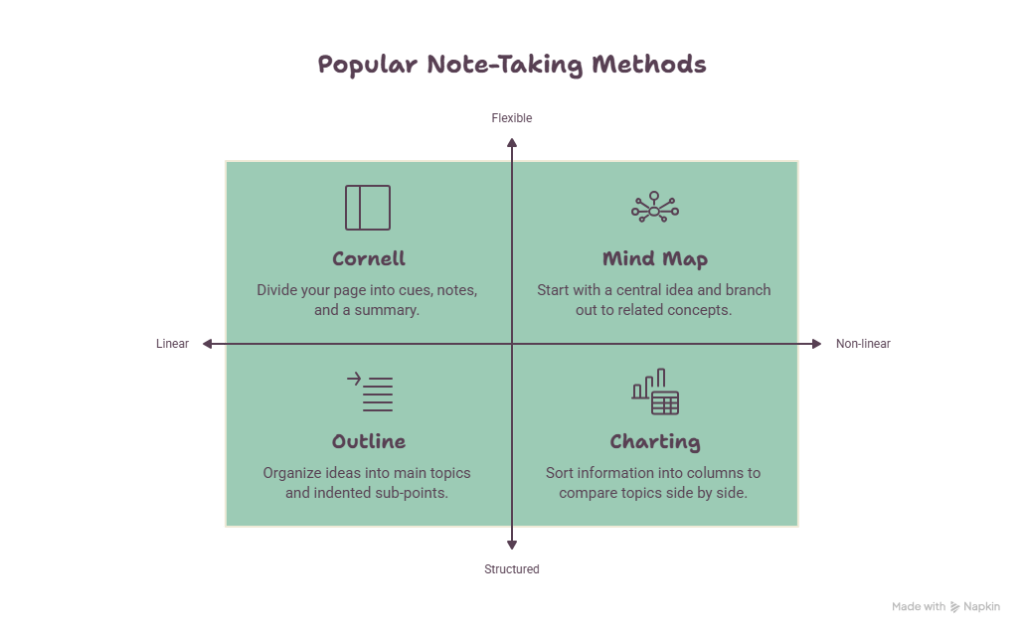
3.1 Cornell Method
3.1.1 How to set up your page
Open a new page of your notebook and grab your writing utensil of choice. You will split the page into four sections. Assuming you’re using a standard 8.5×11 page, start at the bottom and draw a horizontal line about 2 inches up from the bottom edge. Label this section “Summary.” Then, from the left edge of the page, measure 2.5 inches to the right and draw a vertical line from that horizontal line up toward the top of the page. Label this section “Cues Column.” Finally, at the top of the remaining page, write a title and the date.
3.1.2 What goes in each section
The first and most important section is the note-taking area. Your goal here is simply to write down notes from the lecture. Record as many meaningful points as you can. To the left of this is your cues column, which should stay empty as you write. Soon after the lecture, reduce your notes to concise points for reviewing and note anything you have questions on. Lastly, the summary section lies at the bottom of your page. Fill it with a summary of what you learned. Try to work from memory instead of just rewriting your notes, since that helps lock the information in.
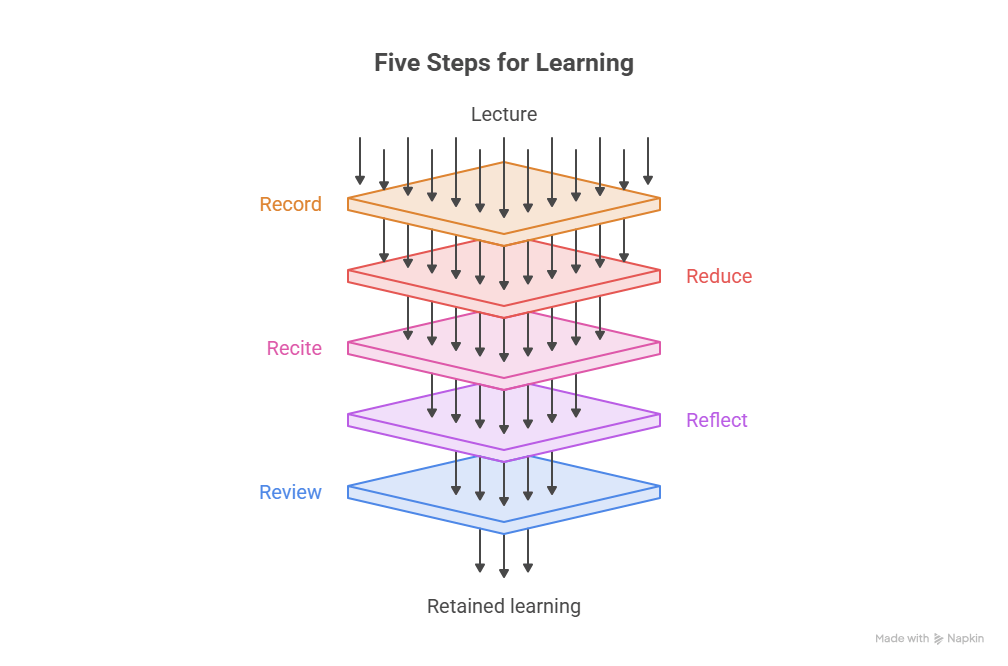
3.2 The 5 R’s
A great practice to build into your note taking is the 5 R’s. Each R brings you closer to retaining the information you take notes on.
Record: During the lecture, record as many meaningful facts and ideas as you can. Write as legibility as possible, and use abbreviations to stay on pace.
Reduce: As soon after as possible, summarize these facts and ideas in the cue column. Highlight areas where clarification is needed.
Recite: Physically cover the note taking area. Using only your jottings in the cue column, speak out loud on key points as if you’re teaching the topic.
Reflect: Draw out patters, connections, or cues to help you remember areas you may be struggling with.
Review: Spend some time outside of studying reviewing your notes to keep ideas fresh.
4. Effective Note Taking
Note taking can feel like a long and structured process so its best to do it as efficiently as possible. This section talks about common practices before during, and after class and how to make the most of these notes.
4.1 Before Class Prep
Note taking may feel like something that only starts in the classroom, but you can get ahead before then. Start by opening the Canvas page for the class and checking the syllabus for today’s topic. Then look for slides, recommended readings, or assignments on that topic. If you want a head start, ask an AI for a brief summary of the concept, and check it against your course materials, since AI can get details wrong.
It’s also important not to get left behind. If you haven’t fully understood a concept from a previous class, now is a good time to review those slides so you aren’t trying to learn two things at once.
4.2 During Class Practices
When trying to learn something its important to give it your full attention. Do as much as you can to minimize distractions during class. To start, go to the restroom, fill your water bottle, and make sure your well fed to avoid any unanticipated mid class breaks. Secondly, find a seat that you know you can concentrate in, and be honest with yourself. Ask yourself whether or not you will be distracted sitting somewhere or near someone. Now, prep your work area to minimize distractions: put your phone on do not disturb and away inside of your bag, and clear anything off your table that isn’t required in your note taking.
All of this has created a good environment to take notes in. Now simply follow the 5 R’s as loyally as possible. Use your preferred note taking method, capture as much information as you can in your notes, but don’t copying the slides 1 for 1. Writing in your own words instills the information much better. If you find yourself running out of time, make abbreviations for your notes. This can be done by writing down keywords, and using the cues sections for areas you may need to revisit. Don’t be afraid to ask for clarification or an explanation of a difficult topic; asking questions in class will allow you to understand topics easier and aid in reduce, one of the 5 R’s.
4.3 After Class Reflection
After class, you may feel overwhelmed by everything you just learned. This is the best time to lock in as much as you can. Go through your notes and fill in your cues column and summary section. Highlight key words and sections you’d like to revisit, and consider making a color-coding system you like. If something is still unclear, ask your teacher before walking out. If you can’t do this right after class, do it the next time you’re free that day.
4.4 Use Office Hours and TA’s
Even after reviewing, some topics won’t click. Your teacher will likely provide sources like homework, slides, and textbooks, but if those don’t help, don’t move on with no understanding of the topic. Attend your teaching assistants’ office hours, which are posted on Canvas and the syllabus. Bring the sections you highlighted and the questions in your cues column, and have someone explain the ins and outs in person. You can also upload class resources and your notes to an AI tool to act as a personal tutor, again checking its answers against your course materials.
5. Utilizing Notes
Just taking notes in class can help increase information retention and help you be a successful student. That being said, knowing how to use your notes and study effectively takes this to the next level. We’ll go over some tips for note organization and the Leitner System, a way to study that is proven to help in memory and recall.
5.1 Organizing Notes
During class, it’s sometimes difficult to keep notes organized. This is especially true if your professor moves fast and doesn’t give any breaks for notetaking. Therefore, it’s useful to spend some time organizing your notes after class to keep them focused on the topic at hand.
Organizing your notes can be as simple as going through and highlighting important terms and sections. If your professor posts slides, it can also be useful to review these while going over your notes. Seeing the same information twice can help in retention. Also, make sure your notes are in your own words. This helps in understanding the information, not just memorizing it.
5.1 Organizing Notes
During class, it’s sometimes difficult to keep notes organized. This is especially true if your professor moves fast and doesn’t give any breaks for notetaking. Therefore, it’s useful to spend some time organizing your notes after class to keep them focused on the topic at hand.
5.2 Quizzing
To aid in memory, recall of the information is necessary. The more often data is retrieved from memory and the longer time between the successful retrievals, the more likely you are to remember the information in the future. The Leitner System capitalizes on this principle perfectly.
5.3 Leitner System
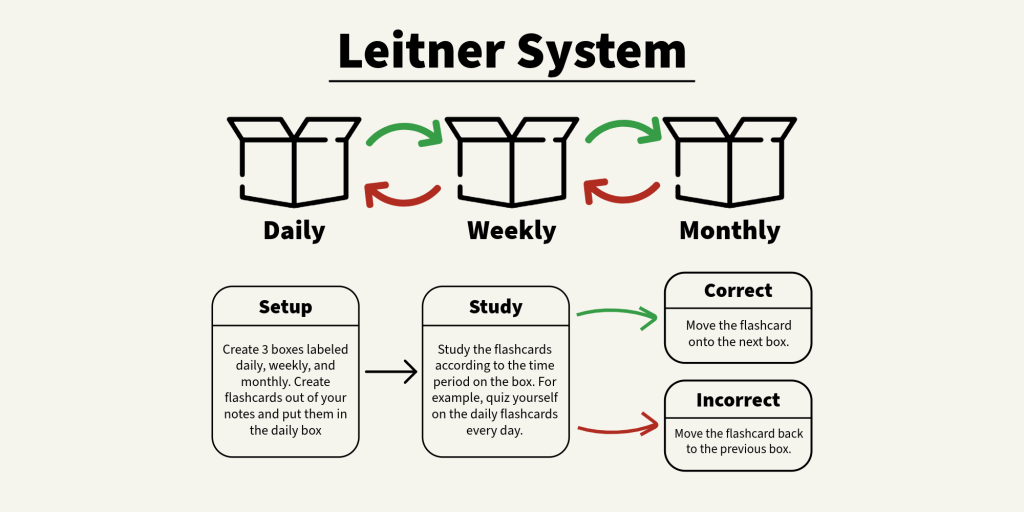
Essentially, the Leitner system is a way of quizzing yourself. Start with labeling some boxes. In this example, we use three boxes labeled daily, weekly, and monthly. This can be changed for your own studying, for example adding in an “every other day” box. Then, create flashcards from your notes and put them all in the daily box. Quiz yourself on these notecards.
If you get the answer correct, the notecard can be moved into the next box, weekly in this case. Then, every day, review the notecards in the daily box. If you get them correct, move them into the weekly box like before.
Once a week, review the weekly box. If you get a notecard correct, you may move it into the monthly box. If it’s incorrect, you move it back into the daily box. This method of studying helps you review the information you are getting incorrect more often while questions you get right are only brushed up upon every once in a while. Although this method of studying does not help in the short term, like cramming for an exam, it’s very helpful in remembering information long term.
5.4 Software
There are many software that can be used for notecard review, like the Leitner System. Some examples are Quizlet or Knowt. These are generally free softwares that allow you to create and review flashcards easily. Although there is no “Leitner System” built into these apps, you can easily create multiple flashcard sets to act as the boxes.
6. Expanding Beyond the Classroom
Notetaking strategies don’t stop in the classroom. There are many other areas that require notetaking, like reading research papers. In these situations, you can follow a similar process to the in-class notetaking. Always make sure to pay attention to the material you’re trying to learn, and take notes during your reading or listening. Jot down any questions you may have. Then, review the notes, answer any questions, and organize your thoughts afterwards. This general framework will help you create notes, study, and remember much more than showing up to class unprepared.


Leave a Reply