

LinkedIn 0 to 100
Turning Your Profile into a Professional Network
Created by Aryan Patel and Inhyeong Park
At Georgia Tech, having a high GPA is not the only key to landing a job.
“LinkedIn: 0 to 100” is a guide to help students boost their profile and make meaningful connections online.
Learn how to turn your LinkedIn profile into a valuable networking asset with GT resources, alumni connections, and successful resume building strategies.
Introduction
Many students at Georgia Tech often feel like a black box between a high GPA transcript and landing a first internship or job. Our guide, “LinkedIn: 0 to 100,” will address a key issue: brilliant students are failing to communicate their technical skills effectively to recruiters and build meaningful professional netwSorks. This is a huge problem because a resume submission does not build a career, but rather an active and optimized LinkedIn profile does. Many students, including us, first thought of LinkedIn as an online version of a resume, missing the chances to connect with alumni, recruiters, and mentors that expand the possibilities of finding jobs.
By following our step-by-step guide, readers will transform their online resume into an active presentation that highlights their skills and experiences and increases their visibility to more connections and employers. Additionally, our guide will introduce students to other campus-specific tools, such as CareerBuzz and GT-Engage, that support networking and career development.
The goal of this is to enable new GT students to go from being an isolated learner to a well-connected individual who can leverage GT resources and build their professional network to find their deserving career opportunities.
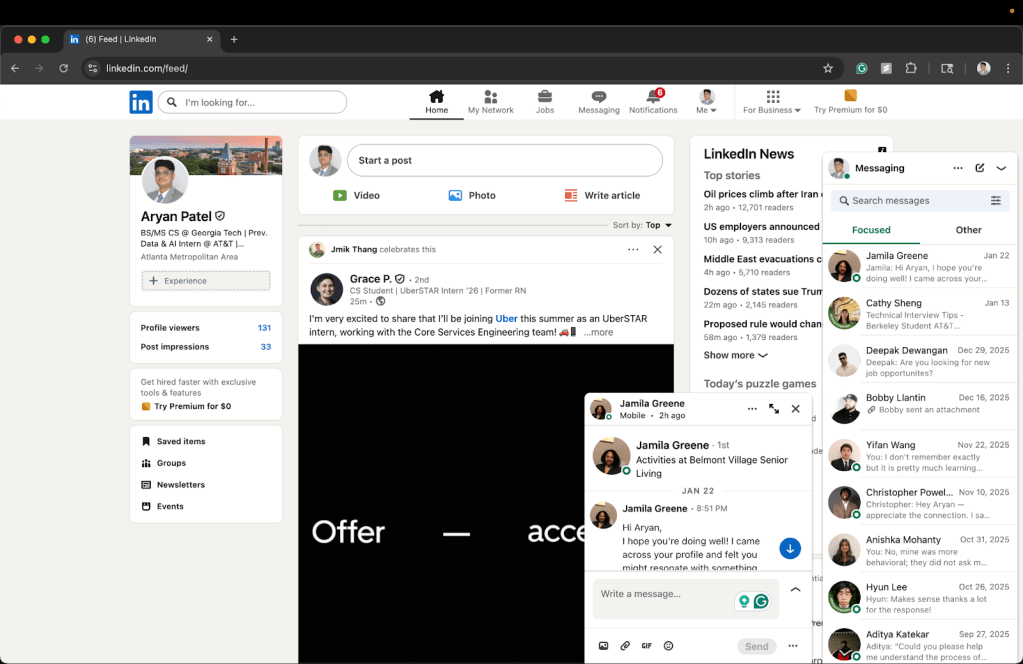
Is Your Profile Ready?
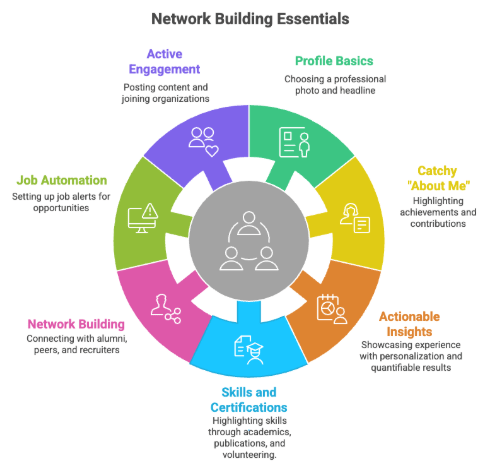
Step 1: Profile Basics
Choose a professional photo and a concise headline
Start by uploading a clear, well-lit photo that fits your face into 60% or more of the frame and shows you dressed in professional or business casual attire. Ensure the image is high resolution, taken in soft, natural light, and avoids distracting backgrounds. Georgia Tech’s Career Center and Student Center offer a free professional headshot service known as the Iris Photo Booth that helps easily meet these requirements.
Use your headline to highlight key parts of your resume
Since your headline appears directly under your name, it should tell your professional story in one line.
Use clear separators between words, using |, and follow the given structure below:
– [Degree Program] @ [University Name]
– Incoming [Role] @ [Company Name]
– Prev. [Role] @ [Company Name(s)]
– Looking for [Desired Position(s)]
– Other relevant roles that highlight skills, like researcher, mentor, entrepreneur, etc.
Some additional tips to consider are to include no more than five parts and meet a character limit of 220. Additionally, avoid repeating the same company part twice. For instance, if you already list Incoming [Role] @ [Company Name], do not include Prev. [Role] @ [Company Name(s)] again.
A relevant example is:
BS/MS CS @ Georgia Tech | Prev. Data & AI Intern @ AT&T | Researcher | Mentor
A non-example is:
BS CS @ Georgia Tech | Incoming SWE Intern @ Google | Prev. SWE Intern @ Google, Amazon | Club Member | Looking for SWE Roles
Step 2: Design a catchy, informative
“AboutMe” Section
Your AboutMe section should summarize to recruiters and peers who you are, what you value, and what you can contribute to a team. Use it to tell a short story, keeping it confident, concise, and conversational.
Highlight your past achievements and future goals
Consider including information about:
– Academic Background:
What you study and where you study it.
– Work or Research Experience:
Where you have worked or interned previously, and what technical or soft skills you developed.
– Leadership and Service:
Any clubs, organizations, or volunteer experiences, and what lessons they taught you.
– Career Goals:
The type of roles, industries, or problems you hope to pursue in the near future.
– Personal Contribution:
How you will add value to a team. Use this to persuade, rather than inform, what you bring to a workplace.
Additional Tips for professional writing
Keep it personal and simple by:
– Writing in the first person (“I…” statements) to personalize your voice.
– Utilizing active verbs such as developed, led, designed, collaborated, and engineered to show action.
– Keeping it short to about 150-300 words, whether that is a single paragraph or 3-4 short ones.
– Avoiding just noting lists of skills and rather showing skills through results.
– Ending with a forward‑looking statement that connects your past experiences to future goals.
Relevant Example
I am Aryan Patel, a current student and researcher. I study Computer Science, pursuing my Bachelor of Science Degree at Georgia Institute of Technology. My most recent work experience includes working as a Data & AI Intern at AT&T to tackle a business problem using creativity, leadership, and public speaking.
My past experiences have taught me core values to communicate with others, respect others, and persuade others. Moreover, they have further prepared me for life scenarios focused on solving problems, managing time, and discovering innovative solutions.
With that in mind, my primary goal is to acquire an entry-level position or internship in the Computer Science field that will utilize, test, and develop these skills and core values.
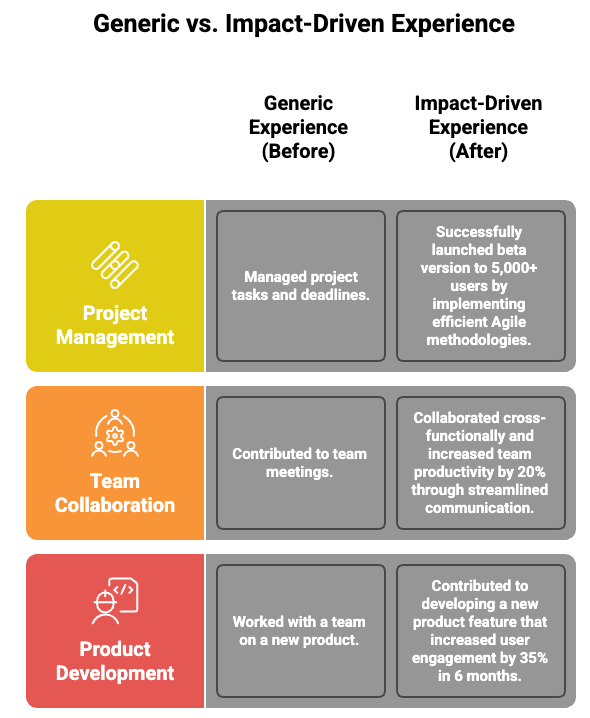
Step 3: Showcase Academic Projects and Experience with applicable results
– Recruiters often look for how you turned knowledge into impact.
– Just describing your experiences in a few statements lacks creativity and does not show action, so ensure you illustrate your experience as a story, showing results and what you did to achieve them.
– Use the STAR and XYZ methods when describing projects, internships, jobs, leadership roles, or volunteer experiences, essentially anywhere you want to show how you made an impact.
Use the XYZ Method to show numerical values, quantifying achievements.
<XYZ Method: The XYZ method is a simple formula for framing achievements as: “Accomplished [X] as measured by [Y], by doing [Z].”>
– Format:
Accomplished [X] as measured by [Y] by doing [Z]
– Example:
Supported 650+ students by building, tuning, and grading assignments about software development fundamentals, contributing to a 15% average improvement in project grades
– Tips:
Whenever possible, include statistics with impact (percentages, number of users, or time saved). If exact numbers are not available, estimate the impact logically.
Use the STAR Framework (Situation-Task-Action-Result) to tell a personal story behind each project.
Follow the four steps and include each within the bullet point:
– Lay out the situation:
Set the scene and explain the challenge or the problem the team was facing.
– Highlight the task:
Explain what you did to help solve the problem.
– Share how you took action:
Detail specific steps, tools, or skills you used to solve the problem.
– Discuss the results:
Share what impact you had, quantifying or qualifying outcomes.
– Examples:
Improved data‑processing performance (S/T) by building and optimizing pipelines in Databricks and Snowflake using PySpark, Python, and SQL (A), which executed ETL on 68M records and increased speed by 80% (R).
Additional Tips to keep in mind
– Begin each bullet with a strong action verb, such as Built, Designed, Automated, Collaborated, Optimized, etc.
– Keep bullets to about one line in resume format. Sometimes it is okay to go over, but do not overdo it for every instance.
– Add only two to three bullets for each experience or project. Sometimes it is okay to include four bullets, but it should not go above that limit.
Step 4: Add to the Skills, Certifications,
and Organizations Section
Add Skills with priority and relevant coursework
– List at least five to eight skills, and prioritize them, putting the strongest skills first.
– Link skills back to a project, course, or job to show where you learned or applied them.
– Examples of relevant soft skills include: Problem Solving, Leadership, Research, Project Management, Teamwork, etc.
– Examples of relevant technical skills include: Machine Learning, Artificial Intelligence, Databases, Java, Python, SQL, AWS, Azure, etc.
Present Certifications and Publications
– Show certifications that demonstrate initiative or professional training (for instance, “AWS Cloud Practitioner,” “Microsoft Technology Associate: Software Development Fundamentals,” “Azure AI Fundamentals”)
-Add publications that highlight research and communication skills (for instance, “Cybersecurity in the quantum age: A bibliometrics review,” “Teacher Preparation and Curriculum Design in Cybersecurity”)
Display Leadership through Organizations and Volunteering
Include roles from community service or GT organizations, and a few bullets similar to projects and experience to demonstrate action and initiative.
Step 5: Build Your Network Intentionally
Meaningful connections matter more than follower counts for landing a job.
Follow the 3-step guide to ensure this:
Find alumni, peers, and recruiters to connect with!
– Use LinkedIn’s “Alumni” filter to identify Georgia Tech graduates currently working at your target companies.
– Navigate to the Georgia Tech LinkedIn page → Alumni tab.
– Filter by company, job title, or location.
– Review profiles and identify common interests or experiences to talk about before connecting.
Personalize messages by adding a note
– Never send a blank connection request. A short, genuine note shows professionalism and effort.
– Write about who you are and why you’re reaching out, while ensuring you stay under the 200-character word limit.
– Example Message:
“Hi [Name], I’m a first‑year CS student at GT interested in data visualization. Your project at [Company] caught my eye! Would love to learn how you approached large‑scale datasets.”
Request customized recommendations and referrals
– Once you have built a meaningful conversation, request possible referrals or recommendations to support your job applications.
– Similarly, request LinkedIn endorsements to acknowledge the credibility of your skills.
– Endorsements strengthen your credibility by confirming your listed skills. After collaborating with someone or completing a team project, politely reach out with a short, specific message.
– Example Message:
“Hi [Name], I really enjoyed working with you on [project/class]. Could you endorse me for [specific skill] when you get a chance? I would be happy to return the favor!”
[Click For the Video]
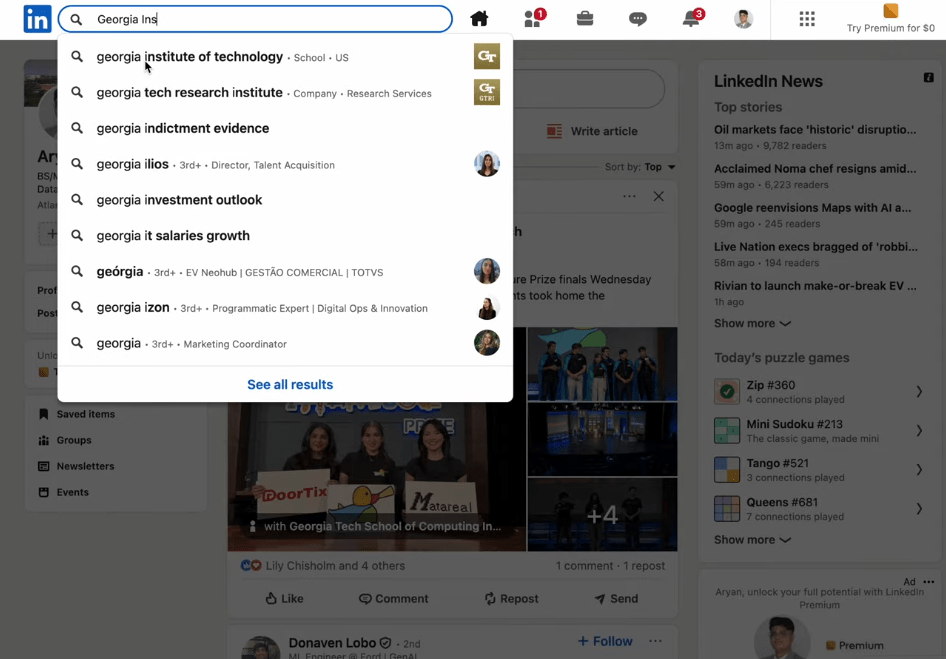
to increase chances of establishing valuable connections.
Step 6: Automate Job Opportunities
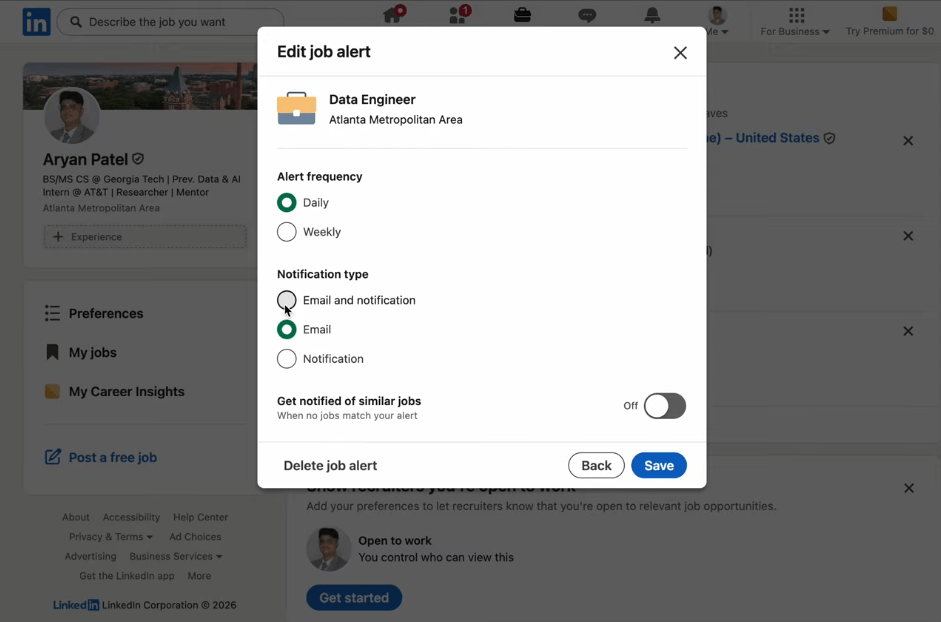
Setting up Job Alerts on LinkedIn, CareerBuzz, and Handshake.
– Receive timely notifications so you can be among the first to apply.
– Choose your preferred notification frequency: daily or weekly.
– Select your notification format: email, in‑app, or both, to stay informed on any device.
– Enable “Get notified of similar jobs” to discover related openings that may match your interests or skill sets.
Setting up Job Alerts for LinkedIn
[Click For the Video]
Step 7: Stay Active and Engaged
Your LinkedIn profile and professional reputation grow through consistent engagement.
Stay visible to recruiters and peers by:
Posting and Reposting content
– Repost articles that reflect your professional interests and share your own thoughts.
– Post takeaways and what you learned at the end of hackathons, research projects, or internships.
– Celebrate peer achievements with reactions and comments to congratulate and support them.
– Tag team members or company names when making new posts to show engagement and collaboration.
Joining organizations with GTEngage
<GT Engage is Georgia Tech’s premier student engagement platform used to discover campus events, join student organizations, and manage involvement>
– Join technical and professional organizations like iOS Club @ GT, RoboJackets, and Data Science @ GT to enhance technical skills (programming and engineering).
– Join cultural or social clubs like the India Club at Georgia Tech, the Vietnamese Student Association, and Alpha Kappa Psi to build connections and soft skills (leadership and community).
Updating your profile every semester to reflect new skills and experiences
Citations
[Image 1]: https://toppng.com/show_download/477018/linkedin-logo-png-free
[Image 2]: Aryan Patel Screenshot
[Image 3]: https://www.napkin.ai/
[Iris Photo Booth]: https://career.gatech.edu/iris-photo-booth/
[XYZ Method]: https://www.tealhq.com/post/xyz-resume
[STAR Framework]: https://www.themuse.com/advice/star-interview-method
[Image 4]: https://www.napkin.ai/
[Video 1]: https://youtu.be/9oOTm1LmF1s (Aryan Patel)
[Video 2]: https://youtu.be/cFdva84hqIk (Aryan Patel)
[GTEngage]: https://gatech.campuslabs.com/engage/


Leave a Reply