
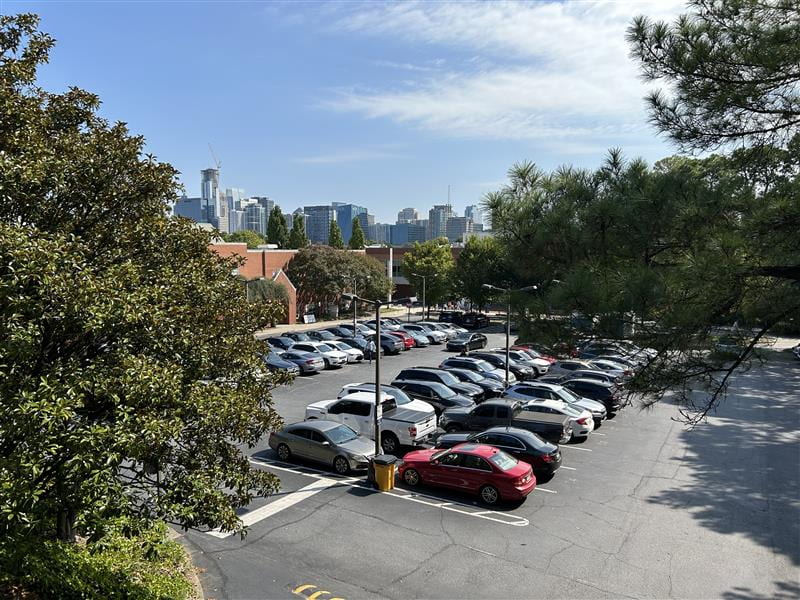
Featured Image caption: Parking at Georgia Tech involves understanding permit requirements, designated zones, and parking restrictions. This guide helps students navigate these rules before bringing their vehicles to campus.
Featured Image Alt Text: Cars parked in a Georgia Tech campus parking area, with a parking information sign and campus buildings visible in the background.
Daniel Gergov and Pratham Patel
The difficulty with parking on the Georgia tech campus does not stem from a lack of parking spaces, but instead understanding the different parking options, permit requirements, and rules to navigate. For students who are new to campus, figuring out where to park, which permit to purchase, and how much to pay can be incredibly confusing. While GT’s Parking and Transportation Services provides this information, its spread across various pages, lacking a centralized location.
Parking needs to vary depending on the student. Someone who commutes every day benefits from an annual permit, whereas someone who rarely drives may be better off with a short term option. Students living on campus have to consider residential parking zones, and those bringing family/friends must understand visitor parking. Even after purchasing a permit, students must keep track of renewals and restrictions to ensure any unnecessary citations.
Our guide aims to simplify this process by collecting the most important information together into one accessible resource for students. We’ll walk them through selecting the best permit, purchasing one, and more. We also plan to include a permit comparison chart, parking map, and screen shots to help students follow along the process. Overall, we want to make parking at Georgia Tech less confusing and help students avoid waste time and money.
Choosing the Right Parking Option
Before buying a permit, there are multiple questions to ask yourself. The right choice depends on how often you drive, where you live, and where you need to be.
Step 1: Determine Your Parking Needs
Estimate how many days a week you will park on campus. Then, you need to decide which group you fit best.
- Daily commuter: you drive to campus most weekdays and need a reserved spot near your classes
- On-campus resident: you keep your car on campus overnight near your dorm
- Occasional driver: you drive a few times to campus or only after 5 p.m. and on weekends.
The flowchart diagram below will help turn your answers into a permit type.
Infographic 1: Which GT Parking Permit Fits You?
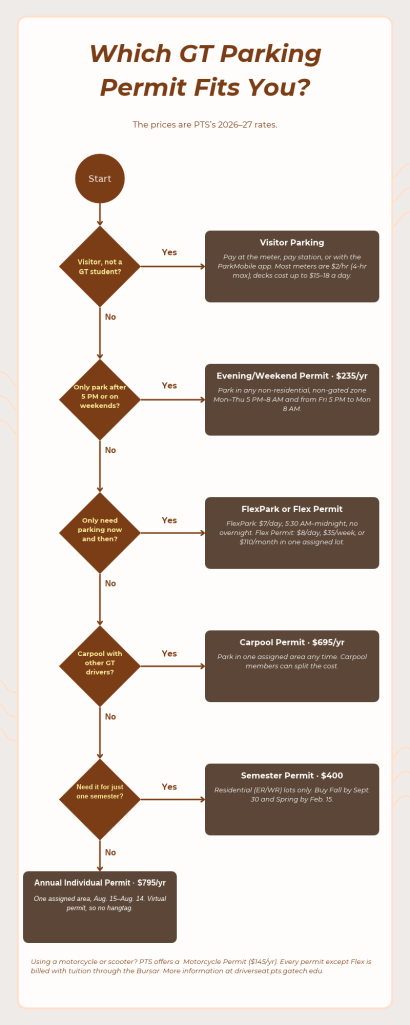
Caption: Students who commute regularly can compare annual and semester permits, while those who only drive occasionally may benefit from shorter-term options. This flowchart helps students narrow down their choices before checking prices and availability.
Alt Text: Flowchart that begins by asking how often a student parks on campus. Regular commuters are directed toward annual or semester permits, occasional drivers toward short-term permits, and visitors toward designated visitor parking
Step 2: Compare Available Parking Permits
Compare the student permits by price, time, and parking locations. Every permit other than Flex is billed through the Bursar along with tuition.
| Permit | Price ‘26-’27 | For | Where/When |
| Annual Individual | $795/year | Daily commuters | One assigned area, any time, Aug. 15-Aug.14 |
| Carpool | $695/year, split between members | Students who carpool | One assigned area, any time |
| Semester | $400 | Residents parking for one semester | Residential (ER/WR) lots only |
| Evening/Weekend | $235/year | Evening and weekend drivers | Non-gated, non-residential lots, Mon-Thu 5PM-8AM and Fri 5PM-Mon 8AM |
| Flex Permit | $8/day, $35/week, $110/month | Occasional drivers | One assigned lot |
| FlexPark | $7/day | Occasional daytime drivers | 5:30AM – midnight, no overnight |
| Motorcycle | $145/year | Motorcycles and scooters | Motorcycle parking areas |
Prices are from the PTS’s 2026-27 rates at the student permit page.
Step 3: Find a Parking Zone Near Your Destination
Take a look at your schedule and note the buildings you visit most, then find the closest zone your permit covers. Zones that start with ER or WR are residential zones; zones starting with E or W are commuter parking lots and decks, and numbered Visitor Areas charge by the hour.
Prior to selecting a zone, ensure it is open to undergraduates. Zones such as E40 Klaus Deck, E46 Burge Deck, and W04 Marietta St. are reserved for faculty and graduate students.
Infographic 2: Where Can You Park at GT?
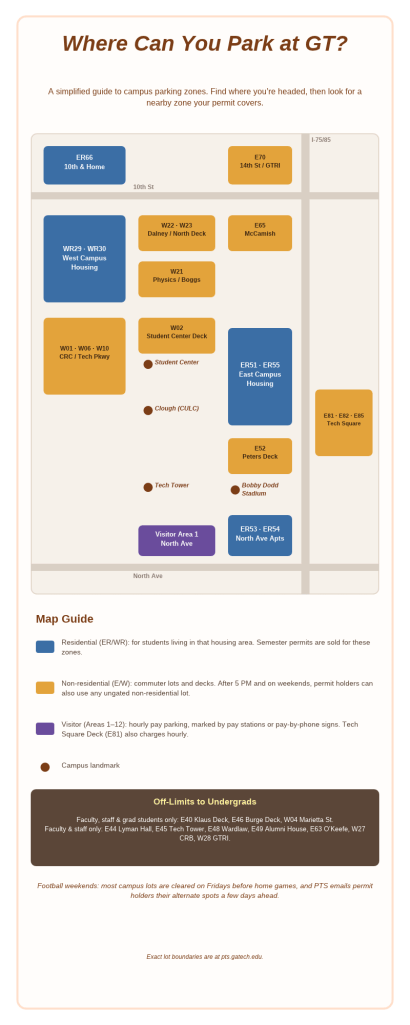
Caption: Georgia Tech separates parking into different zones, each with its own restrictions. Students can use this map to find parking near their classes or residence halls, but should confirm that their permit allows access to the selected zone.
Alt Text: Color-coded GT campus map showing East & West campus parking zones, residential parking areas, and visitor lots. Major campus buildings are labeled to help students locate nearby parking.
Once you are aware of the right permit for you, you can buy it in the driver’s seat portal and confirm everything is set up correctly. Permits are sold first come first serve and the popular lots will thus fill up quickly.
Step 4: Purchase Your Parking Permit
- Go to https://driverseat.pts.gatech.edu/ and login with your GT account
- Pay any outstanding citations first, since PTS will not sell you a permit if you owe money.
- Navigate to the permits tab, and click ‘Purchase Permit’.
- Add every vehicle you are considering driving to campus, including a parent’s car or any rental. The license plate acts as your permit, since the parking permits are virtual.
- Select your permit type and an available parking location.
- Review the order and finish the purchase.
Multimodal Element 1: Annotated Driver’s Seat screenshot
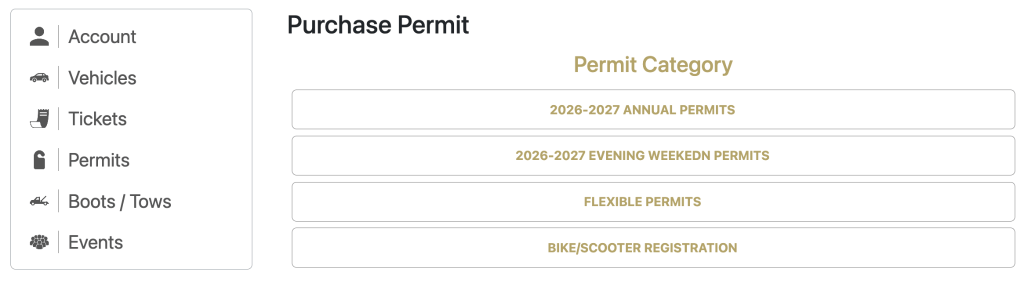
Caption: Georgia Tech’s Driver’s Seat portal allows students to purchase and renew permits, update their vehicle information, and manage citations. The highlighted sections show where to find these features.
Alt text: Screenshot of Georgia Tech’s Driver’s Seat parking portal with annotations pointing to permit purchasing, vehicle registration, and citation management options.
Step 5: Understand Your Parking Charges
Verify when and how you’ll pay since the annual semester and most other permits are billed through the bursar with your tuition. The flex plan charges you as you park. After purchasing a permit, log into the portal with your GT account and confirm the parking charge and permit shows as active. Be sure to read the refund rules before buying any permit, since PTS limits refunds for permits purchased late in the year.
Step 6: Renew Your Permit Before It Expires
Parking permits don’t automatically renew, so make sure to renew yours before the deadline to avoid losing your parking location.
- Log into the Driver’s Seat Portal using your GT account
- Check your current permit’s expiration data and look for the renewal option
- Confirm that your vehicle and license plate are accurate
- Complete the renewal process and verify that your permit is active for the upcoming academic year.
For the 2026-27 academic year, the annual period was April 1-15, 2026. Renewing during this period guaranteed students their existing permit type and parking location. Students who miss the renewal window must purchase a permit during general sales, where popular zones may be full. Check the PTS website each spring for deadlines.
Step 7: Find Temporary or Visitor Parking
If you’re only parking on campus occasionally or have friends and family visiting, purchasing an annual permit is not necessary. GT offers visitor parking and temporary permits for shorter stays.
- Visit the Visitor Parking Page to find available visitor lots and decks
- Choose a location near your destination and check its hourly rate
- Pay using the posted payment station depending on the location
- If you need parking for multiple days, compare visitor rates
Visitor parking prices and payment methods vary by location. Always check the posted signs before leaving your vehicle, especially when parking overnight or during campus events.
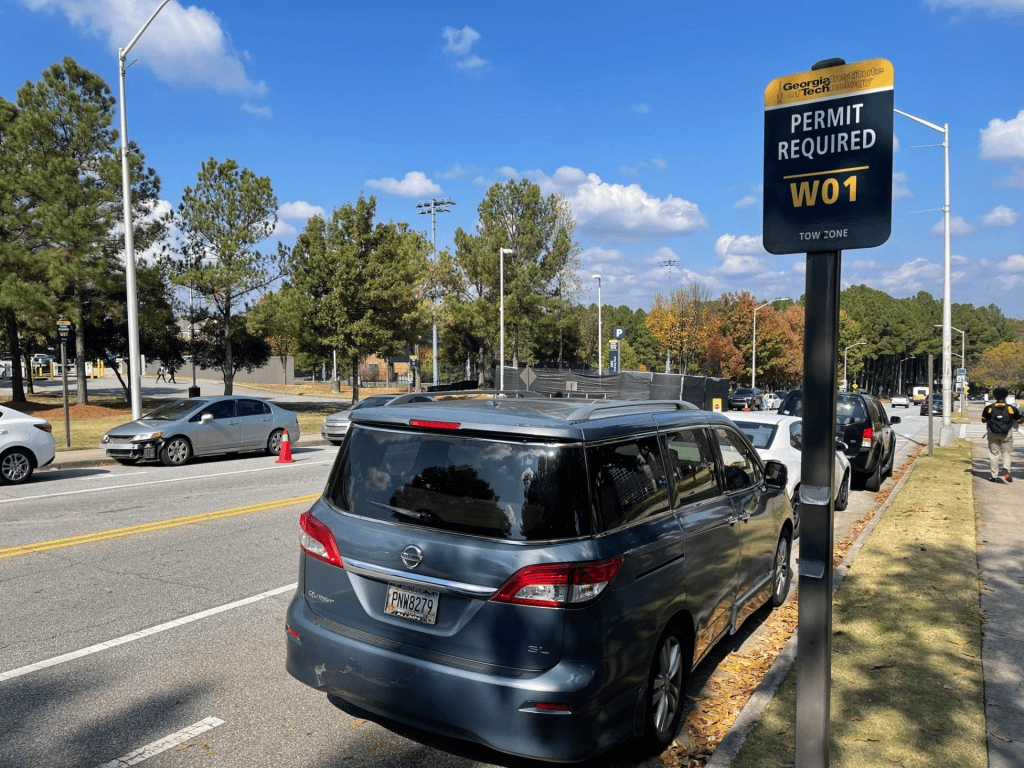
Caption: Parking signs identify restrictions and payment requirements that may differ between campus locations. Students should check these signs before leaving their vehicles to avoid parking in an unauthorized area
Alt text: Parking sign at a Georgia Tech visitor lot displaying the parking area’s identification, payment info, and posted restrictions
Step 8: Follow Parking Rules to Avoid Citations
Even with a valid permit, students can receive citations for parking in unauthorized locations or campus restrictions. GT enforces parking regulations 24hrs/day, including weekends.
To avoid fines, remember these rules:
- Park in your assigned zone
- Keep your vehicle information updated
- Check posted signs
- Watch for special events
- Do not share permits
Before parking somewhere unfamiliar, check Parking Rules to confirm that your permit allows access.
Step 9: Pay or Appeal a Parking Citation
If you receive a parking citation, address it promptly to avoid fees. GT requires students to either pay or appeal a citation within 10 days of its issuing.
To pay a citation:
- Log into a Driver’s Seat portal
- Navigate to your citations and locate the outstanding fine
- Review the violation and complete the payment.
To appeal a citation:
- Open the citation in Driver’s Seat and select appeal option
- Explain why you believe citation was issued
- Include support evidence, such as photos, receipts, or permit info
- Submit appeal within 10 calendar days and monitor email for decision
Citations that remain unpaid after 10 days receive a $5 late fee unless they are under appeal. Unpaid student citations are transferred to Brusor after 30 days and can prevent future permit purchases.

